Takeoff
Measure quantities off drawings and turn them into priced estimate lines.
Takeoff
A takeoff is the act of measuring quantities off a drawing — areas, lengths, counts. Takeoff measures how much; assemblies (applied later in Cost build-up) turn those quantities into priced lines. Doing the two together is the fastest path from a PDF drawing to a priced estimate.
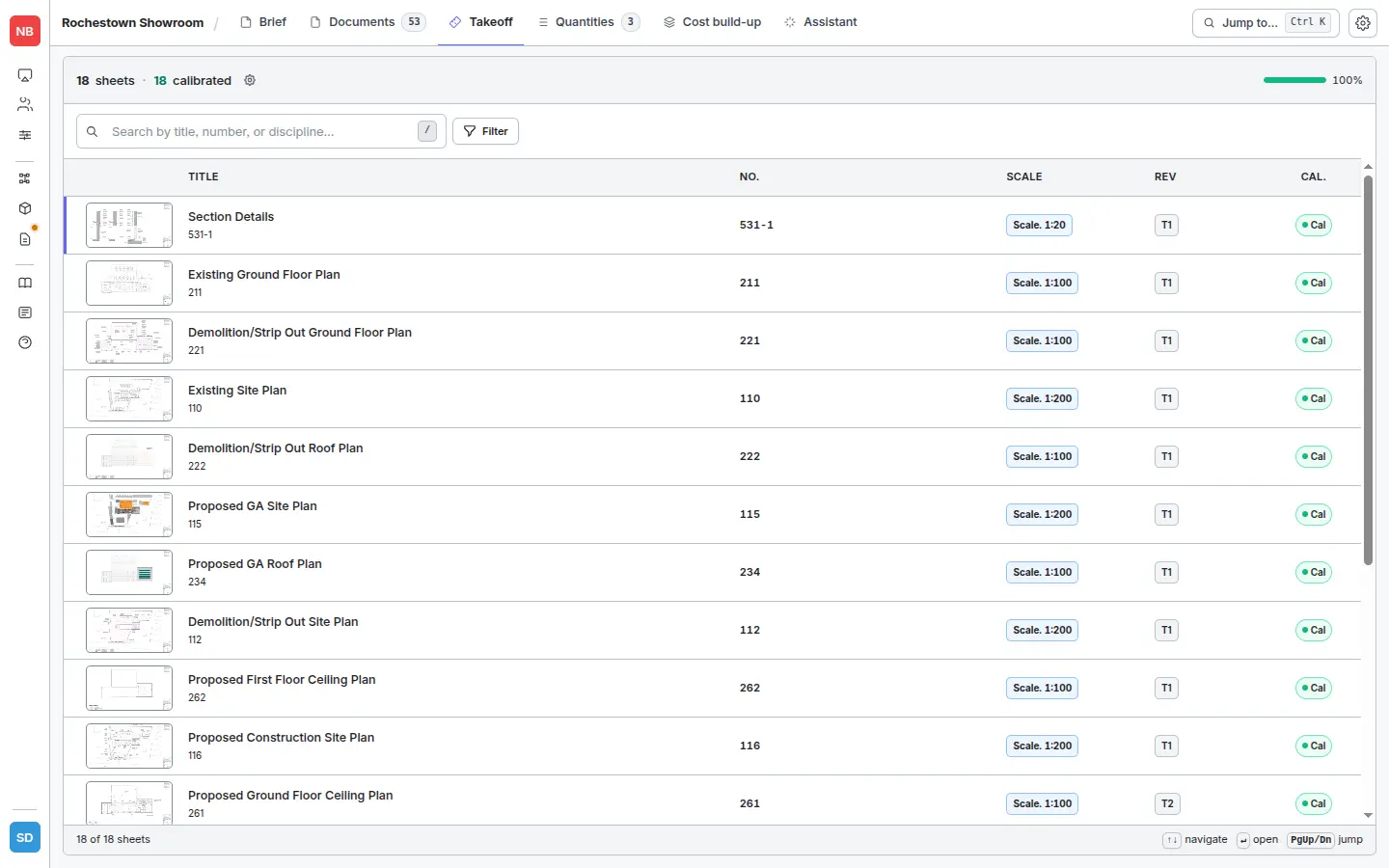
Everything starts at the project’s Takeoff tab — the drawing register lists every sheet, its scale, revision, and whether it’s been calibrated.
In this section
- Measuring — open a drawing, check the scale, use the count / length / area tools, and collect shapes into items.
- Naming items — why two extra seconds on a name pays off in better AI assembly suggestions.
- Applying assemblies — turn measured items into priced rates in Cost build-up.
- Live updates — what changes automatically when you re-measure or your rates move.
- MeasuringOpen a drawing, check the scale, and use the count, area, and length tools to measure off it.
- Naming Takeoff ItemsWhy two extra seconds on a name pays off in better AI-suggested assemblies.
- Applying Assemblies in TakeoffTurn measured takeoff items into priced lines and push them into your estimate.
- Live UpdatesWhat changes automatically when you re-measure shapes, update assemblies, or change supplier prices.